Watch the video below to see how to find your results after sending them to your CRM. Don’t worry, your leads are still there! We’ll show you exactly where to view them.
Sent vs. Unsent Results
When you send leads to your CRM, they move from Unsent to Sent.
Check both tabs to keep track of everything.
How to Find Sent Results
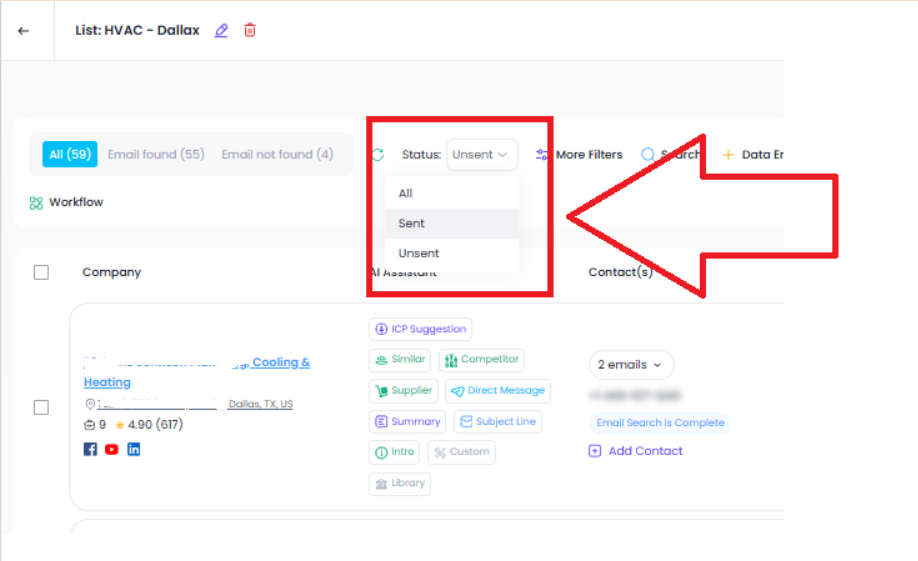
If your leads “disappear,” they were probably sent to the CRM.
Switch the view to Sent Results to see them.
In Sent Results, you can see the emails and business info that were sent.
Use this to double-check what went to your CRM.
You can resend the same email or send more emails from the same company.
Use multi-select to resend or send extra info.
Each Saved List may show different sent or unsent results.
Switch between Saved Lists to keep track of everything.
If a Saved List looks empty, it may be showing Unsent only.
Change it to Sent Results to see the leads that were already processed.
Was this article helpful?
That’s Great!
Thank you for your feedback
Sorry! We couldn't be helpful
Thank you for your feedback
Feedback sent
We appreciate your effort and will try to fix the article